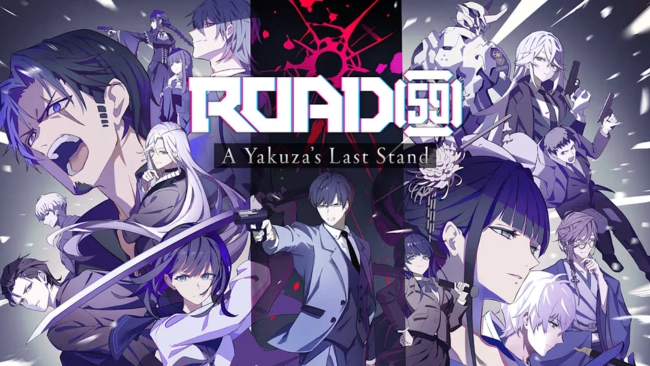
ROAD59 A Yakuza’s Last Stand Free Download

ROAD59 A Yakuza’s Last Stand Free Download

Enjoying this game? Rate it!
Table of Contents
  1. Game Overview
  2. Screenshots
  3. Installation
  4. System Requirements
  5. Setup Guide & Troubleshooting

Game Overview

ROAD59 A Yakuza’s Last Stand PC Download

ROAD59: A Yakuza’s Last Stand pulled me into Tenkai Ward like I’d been walking those neon-lit streets all my life. Sho Himuro wasn’t the kind of boss I expected—he wasn’t ruthless or cold. He was tired, kind even, a man who wanted out but couldn’t stop walking further in. That contradiction hit me hard: born into blood, yet aching for peace.

The story cut between skyscrapers and smoky bars, where whispers carried as much danger as blades. Every drink poured in ROAD59 felt like a confession, every choice a weight pressing tighter on Sho’s shoulders. And the Jingi—the blood-forged powers—were as terrifying as they were tragic. To share blood was to abandon humanity, to carve yourself into something that could never return. Watching characters wrestle with that fate was as gripping as the fights themselves.

It wasn’t perfect. Some parts of the story moved too fast, like pages torn out of a thicker book, leaving me hungry for more. But what stayed were the people: the stern yet soft older sister Shizuka, the relentless enemies turned almost sympathetic, and Sho himself, standing between ruin and salvation with nothing but honor to keep him upright.

By the time the credits rolled, it felt less like an ending and more like a beginning—the kind of prologue that promises the storm is only just breaking. And if the tangled loyalties and battles of ROAD59: A Yakuza’s Last Stand kept you hooked, then download Esports Godfather Hero Expansion Pack, because trading blood oaths for battlefield tactics still demands sacrifice and strategy.

Screenshots

Installation

  1. To download any game, click the button below to be redirected to any hosting site.
  2. The site can have a timer of 10 seconds, so please wait, and after that click 'download' and wait for the download to complete.
  3. After full downloading, right-click the .zip/.rar/.iso file and then select 'Extract to ROAD59 A Yakuza’s Last Stand' (I suggest you use WinRAR).
  4. Open the folder and run the game as administrator.
  5. If you get any errors such as missing DLL errors, install the program available in the Redist or _CommonRedist folder.

System Requirements

OS
Windows 10 64bit / Windows 11
Processor
Core i3-540 3.06GHz and higher
Memory
8 GB RAM
Graphics
1280×720 and higher(16:9)
DirectX
Version 10
Storage
5 GB available space
Published
Updated
File size
996 MB
Created by
株式会社ロケットスタジオ
Release date
September 24, 2026
Posted by
STEAMUNLOCKED

Something out of date or not working? Report an update

Setup Guide & Troubleshooting

How do I fix missing DLL errors for ROAD59 A Yakuza’s Last Stand?

Open the _Redist or _CommonRedist folder in the ROAD59 A Yakuza’s Last Stand folder. Install DirectX, Vcredist, and any other files there. Then start the game again.

What should I do if the downloaded file is corrupted?

The full file size is 996 MB. Make sure the download is complete. Use 7-Zip to extract it. If you still get a "file corrupted" error, download the file again.

Do I need to run ROAD59 A Yakuza’s Last Stand as administrator?

Usually, no. Open ROAD59 A Yakuza’s Last Stand normally from its folder. If you get a permission or save error, make sure the folder allows writing. Use administrator mode only if it is needed.

How do I update my GPU drivers for ROAD59 A Yakuza’s Last Stand?

ROAD59 A Yakuza’s Last Stand needs 1280×720 and higher(16:9). Update your NVIDIA or AMD drivers to the latest version for better performance.

ROAD59 A Yakuza’s Last Stand won't launch, what should I try?

First, check that the game was extracted correctly. Also check your PC system requirements. If you see an error, read the message carefully. Missing DirectX or Microsoft Visual C++ Redistributable files may need to be installed.

My antivirus is blocking ROAD59 A Yakuza’s Last Stand, is it safe?

Do not ignore an antivirus warning. Check what your antivirus detected. Keep your antivirus turned on. Do not open or restore the file unless you know the warning is a false positive. If you are not sure, keep the file quarantined.

Need more help? Join our Telegram or Discord community, or contact us.

You May Also Like

0 Comments

Comments are moderated. Plain text only — links aren't allowed.