Hanako’s Flower Shop Free Download

Hanako’s Flower Shop Free Download

Enjoying this game? Rate it!
Table of Contents
  1. Game Overview
  2. Screenshots
  3. Installation
  4. System Requirements
  5. Setup Guide & Troubleshooting

Game Overview

Hanako’s Flower Shop PC Download

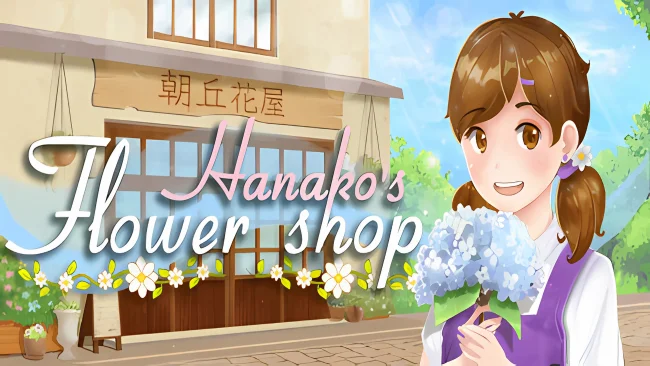
Hanako’s Flower Shop feels like a warm cup of tea on a rainy day. The moment I stepped into Hanako’s little flower shop, I knew I was in for something calm, emotional, and healing. It’s not your usual visual novel; it’s more like living someone’s quiet, bittersweet story.

You play Hanako, a young woman trying to keep her grandfather’s legacy alive by running his flower shop. I liked that you're not just clicking through dialogue; you make bouquets using the language of flowers: red roses for love, lilies for modesty, chrysanthemums for sorrow. Customers come in with little emotional stories, and it's up to you to listen and match flowers to feelings. 

The soft and anime-inspired art of Hanako’s Flower Shop works well for the cosy tone. Voice acting is surprisingly good, and it’s nice to sit back and let the story unfold. There’s no pressure here, no timers, no stress. You can pick flowers from the forest, plant seeds in the garden, or take a break and snack on sweets. And yes, there's even a sheep-jumping animation when Hanako goes to bed. I smiled every time.

Now, Hanako’s Flower Shop is not perfect. I do wish the font were a bit bigger, especially for those of us on laptops. And after a few hours, some parts of the gameplay can feel repetitive. You care for flowers, talk to one or two customers daily, and ensure not to run out of money. But somehow, even with that simplicity, it didn’t feel boring. The relaxing pace and the little emotional moments kept me hooked. After tending to flowers and peaceful moments, you can download Shimagami and step into a world of intense supernatural battles and ancient powers.

Screenshots

Installation

  1. To download any game, click the button below to be redirected to any hosting site.
  2. The site can have a timer of 10 seconds, so please wait, and after that click 'download' and wait for the download to complete.
  3. After full downloading, right-click the .zip/.rar/.iso file and then select 'Extract to Hanako’s Flower Shop' (I suggest you use WinRAR).
  4. Open the folder and run the game as administrator.
  5. If you get any errors such as missing DLL errors, install the program available in the Redist or _CommonRedist folder.

System Requirements

OS
Windows 7
Processor
CPU 1.3GHz
Memory
2 GB RAM
Graphics
N/A
DirectX
Version 9.0c
Storage
1 GB available space
Published
Updated
File size
3.98 GB
Created by
FantaJI Games
Release date
April 25, 2026
Posted by
STEAMUNLOCKED

Something out of date or not working? Report an update

Setup Guide & Troubleshooting

How do I fix missing DLL errors for Hanako’s Flower Shop?

Open the _Redist or _CommonRedist folder in the Hanako’s Flower Shop folder. Install DirectX, Vcredist, and any other files there. Then start the game again.

What should I do if the downloaded file is corrupted?

The full file size is 3.98 GB. Make sure the download is complete. Use 7-Zip to extract it. If you still get a "file corrupted" error, download the file again.

Do I need to run Hanako’s Flower Shop as administrator?

Usually, no. Open Hanako’s Flower Shop normally from its folder. If you get a permission or save error, make sure the folder allows writing. Use administrator mode only if it is needed.

How do I update my GPU drivers for Hanako’s Flower Shop?

Hanako’s Flower Shop needs N/A. Update your NVIDIA or AMD drivers to the latest version for better performance.

Hanako’s Flower Shop won't launch, what should I try?

First, check that the game was extracted correctly. Also check your PC system requirements. If you see an error, read the message carefully. Missing DirectX or Microsoft Visual C++ Redistributable files may need to be installed.

My antivirus is blocking Hanako’s Flower Shop, is it safe?

Do not ignore an antivirus warning. Check what your antivirus detected. Keep your antivirus turned on. Do not open or restore the file unless you know the warning is a false positive. If you are not sure, keep the file quarantined.

Need more help? Join our Telegram or Discord community, or contact us.

You May Also Like

0 Comments

Comments are moderated. Plain text only — links aren't allowed.